Lesson 21 of 36 · 10 min
Using the calculator in real life.
The math is the easy part. The important skill is knowing which number comes from the vial, which comes from the liquid you added, which comes from the reference you are following, and which number is simply the calculator result.
What you’ll learn
See the calculator first
These are the fields you are looking for.
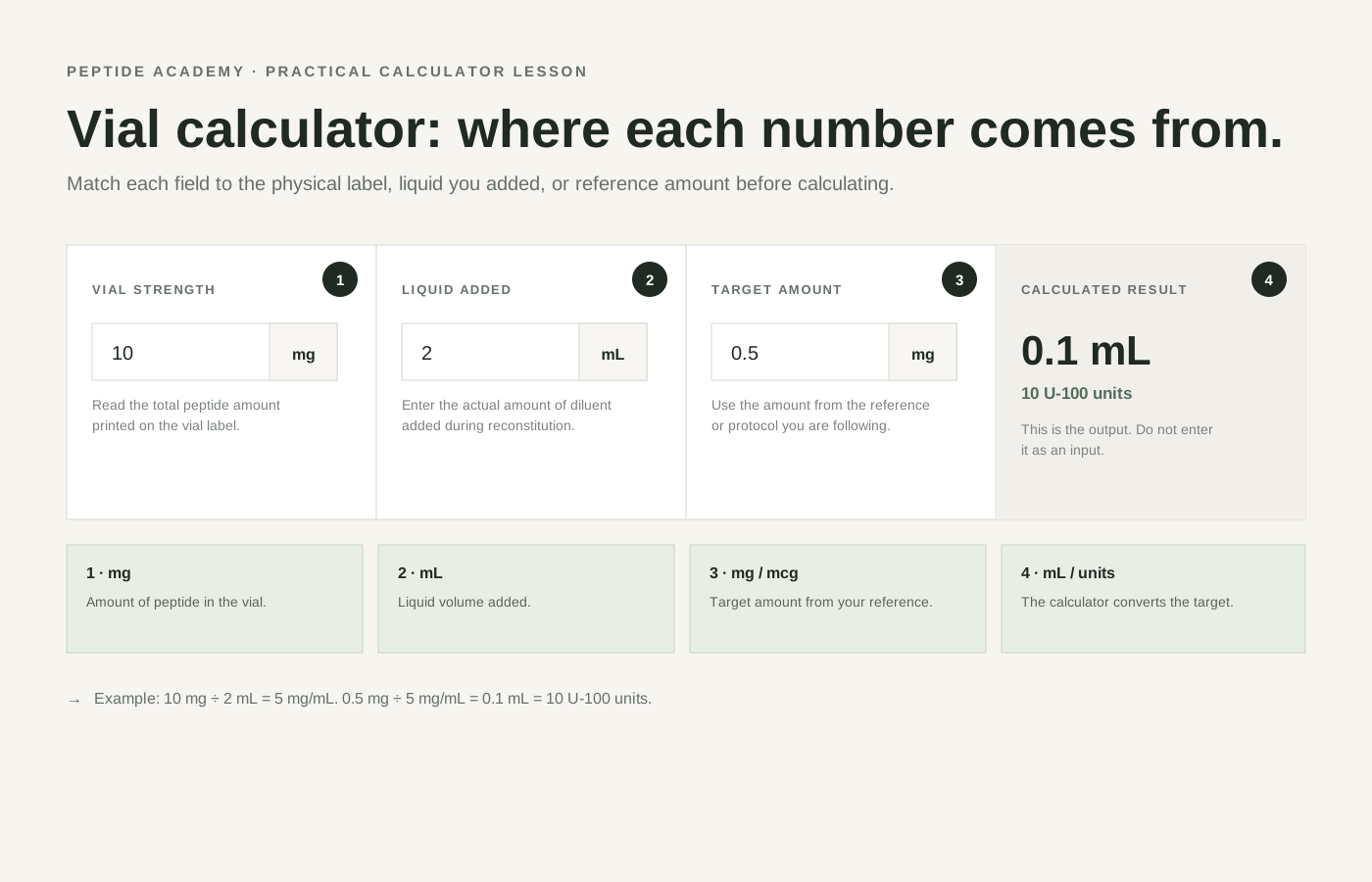
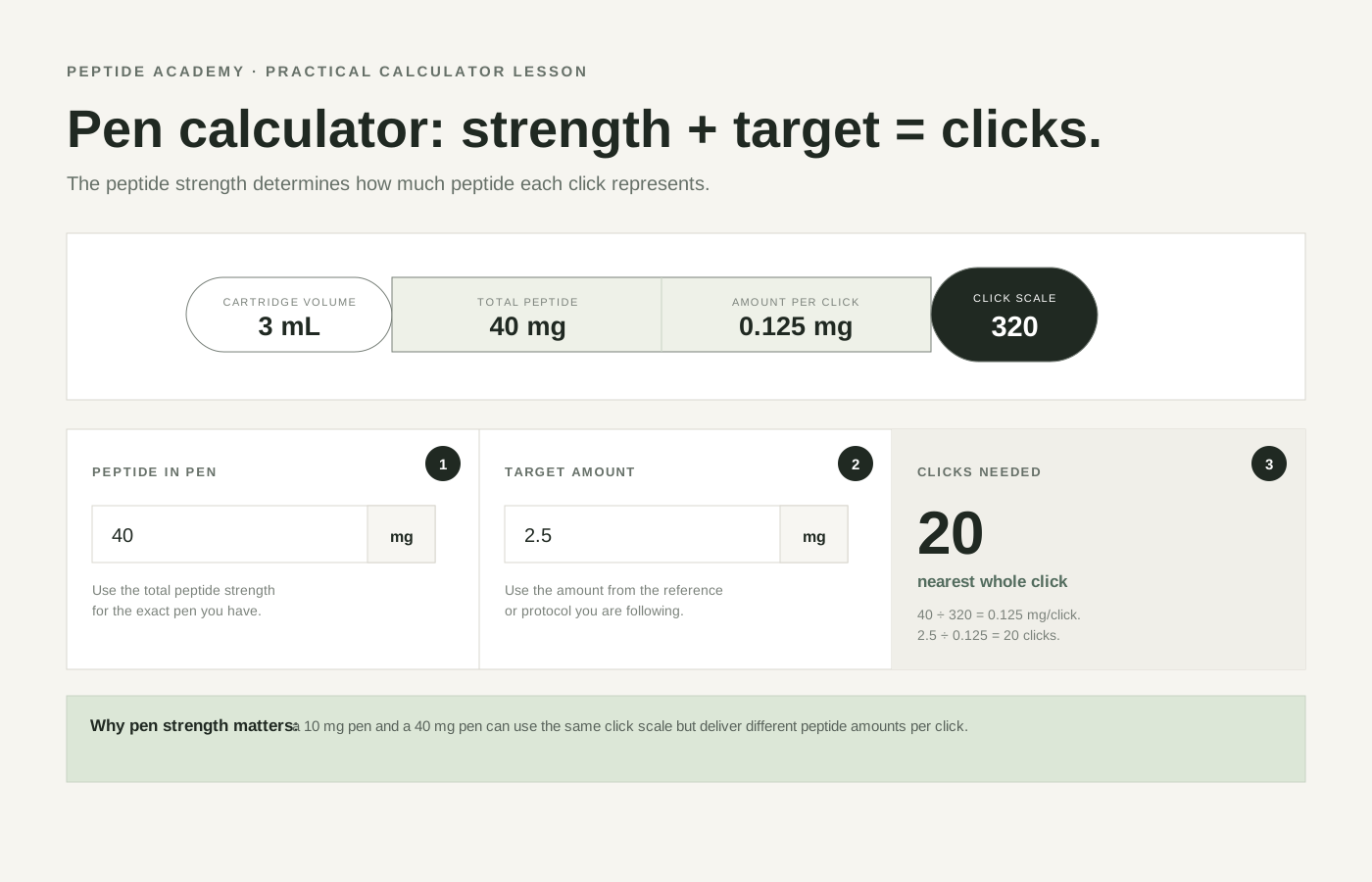
The screenshots below use the same labels as the calculator. The numbered markers show which values you need to identify before you calculate.
Before you type anything
Know where every number came from.
Never treat the fields as four numbers you are expected to guess. Each one has a physical or reference source. If you cannot identify the source, stop and find it before calculating.
Input 1
Vial strength
10 mg
Where to find it
Read the total peptide amount printed on the vial label.
If the label says BPC-157 10 mg, enter 10 mg.
Input 2
Liquid added
2 mL
Where to find it
Use the amount of diluent that was actually added during reconstitution.
If 2 mL was added to the vial, enter 2 mL.
Input 3
Target amount
0.5 mg
Where to find it
Use the amount from the reference or protocol you are following.
On The Pep Report this may come from a peptide profile or dosing reference card. The calculator does not choose it for you.
Input 4
Syringe scale
U-100
Where to find it
Read the syringe type printed on the packaging or barrel.
A U-100 syringe uses 100 units to represent 1 mL.
Worked vial example
10 mg vial + 2 mL liquid + 0.5 mg target
Vial label
10 mg
The vial contains 10 mg total.
Liquid added
2 mL
You added 2 mL of diluent.
Concentration
5 mg/mL
10 mg ÷ 2 mL.
Target
0.5 mg
The amount from the reference you chose.
Result
0.1 mL = 10 U-100 units
Because 0.5 mg ÷ 5 mg/mL = 0.1 mL. On a U-100 syringe, 0.1 mL corresponds to 10 units.
Where does the target amount come from?
It is not the number printed on the vial.
On The Pep Report
Peptide profiles and dosing cards show source-specific reference ranges. If you are using one of those references, the amount you choose from that reference is the target amount entered into the calculator.
Open the dosing reference cards →From another protocol
If you are following a clinician's instruction, study protocol or another defined reference, use the amount stated there. The calculator converts that amount into concentration, volume or clicks; it does not select the amount.
Vial or pen?
Use the calculator that matches the format.
Vial calculator
Use this when concentration depends on the total peptide in the vial and the liquid volume added.
You provide: total mg, liquid mL, target mg/mcg.
It returns: concentration, mL to draw and U-100 units.
Pen calculator
Use this when you know the total peptide strength of the pen and the click scale used by that pen model.
You provide: total mg in the pen and target mg.
It returns: the corresponding click count.
Fictional training device · arithmetic only
40 mg training pen · 320-click scale · 2.5 mg fictional target
These numbers are invented to teach the calculation. They are not a product specification, dose recommendation or instruction for a real pen.
1. 40 mg ÷ 320 clicks = 0.125 mg per click.
2. 2.5 mg ÷ 0.125 mg per click = 20 clicks.
3. The calculator displays 20 clicks.
Three mistakes to avoid
Putting the vial's total mg into the target-amount field.
Vial strength is the total amount in the container. Target amount is the amount from the reference you are following.
Entering syringe units as if they were mg.
Syringe units measure liquid volume on a U-100 scale. They only become a peptide amount after concentration is known.
Copying a pen click count from a different-strength pen.
The same number of clicks can represent a different peptide amount when concentration changes.
Practice with the real tool
Open the calculator and reproduce the examples.
Try the 10 mg / 2 mL / 0.5 mg vial example and the 40 mg / 2.5 mg pen example before taking the quiz.
Open calculatorThe safety reason for showing your work
Correct arithmetic cannot rescue the wrong input.
FDA has documented compounded-semaglutide overdoses where people confused mg, mL and syringe units, including reported errors of five to twenty times the intended amount. The Pep Report calculator therefore makes every input visible and expects the target amount to come from an external source rather than inventing one.
Further reading
Lesson finished
Ready for the checkpoint?
The quiz opens on its own page. Get every answer correct to mark this lesson complete and continue.
Take lesson quiz →Previous
mg, mcg, mL & syringe units ←
Next lesson
Reconstitution, step by step →
Continue when you are ready, or come back to this lesson whenever you need a refresher.